 EasyPOS KSA
The point of sale built for Saudi Arabia
Run your restaurant, café or shop from one Android tablet or Windows PC — even without internet. ZATCA e-invoicing, Arabic & English receipts and the new Riyal sign are built in.
ZATCA Phase 1 & Phase 2 · Works offline · Arabic & English
Features
Everything a Saudi restaurant or shop needs
ZATCA e-invoicing
Phase 1 QR invoices and Phase 2 (Fatoora): B2C reporting, B2B clearance, credit notes and a clear status for every invoice.
Works offline
The tablet or PC is the server. Sales never stop when the internet does; pending invoices are sent when you are back online.
Arabic & English receipts
One clean receipt with every label in English and Arabic, the new Riyal sign and the ZATCA QR code.
Restaurant mode
Dine-in tables, takeaway, delivery and online orders, kitchen display and kitchen tickets.
Retail mode
Fast barcode scanning, items sold by weight, quotations and draft invoices, A4 invoices.
Live dashboard
Net sales, payment methods, sales by category, busy hours and a daily sales target at a glance.
VAT return ready
Sales VAT, purchase VAT and net VAT payable for any month or quarter, ready to print or share as PDF.
Purchases & stock
Supplier invoices add stock and update costs, with a warning when you sell below cost. Stock counts and supplier returns included.
Barcode & shelf labels
Print A4 label sheets with the VAT-inclusive price and a barcode for every product.
Reorder suggestions
See what is running low, grouped by supplier, with a suggested quantity to order.
Customers in seconds
Add a customer by phone number at the till; their name and number print on the receipt and their history builds up.
Print & share
Bluetooth, network and USB thermal printers, A4 printing, and PDF invoices shared by WhatsApp or email.
Solutions
Built for your kind of business
Restaurants & cafés
Dine-in tables, takeaway, delivery and online orders, with a kitchen display and kitchen tickets.
See restaurant POSRetail & shops
Fast barcode scanning, items sold by weight, purchases, stock counts and shelf labels.
See retail POSZATCA e-invoicing
Phase 1 QR invoices and Phase 2 (Fatoora) reporting and clearance, even when you are offline.
See e-invoicingSee it in action
Real screens, real workflow
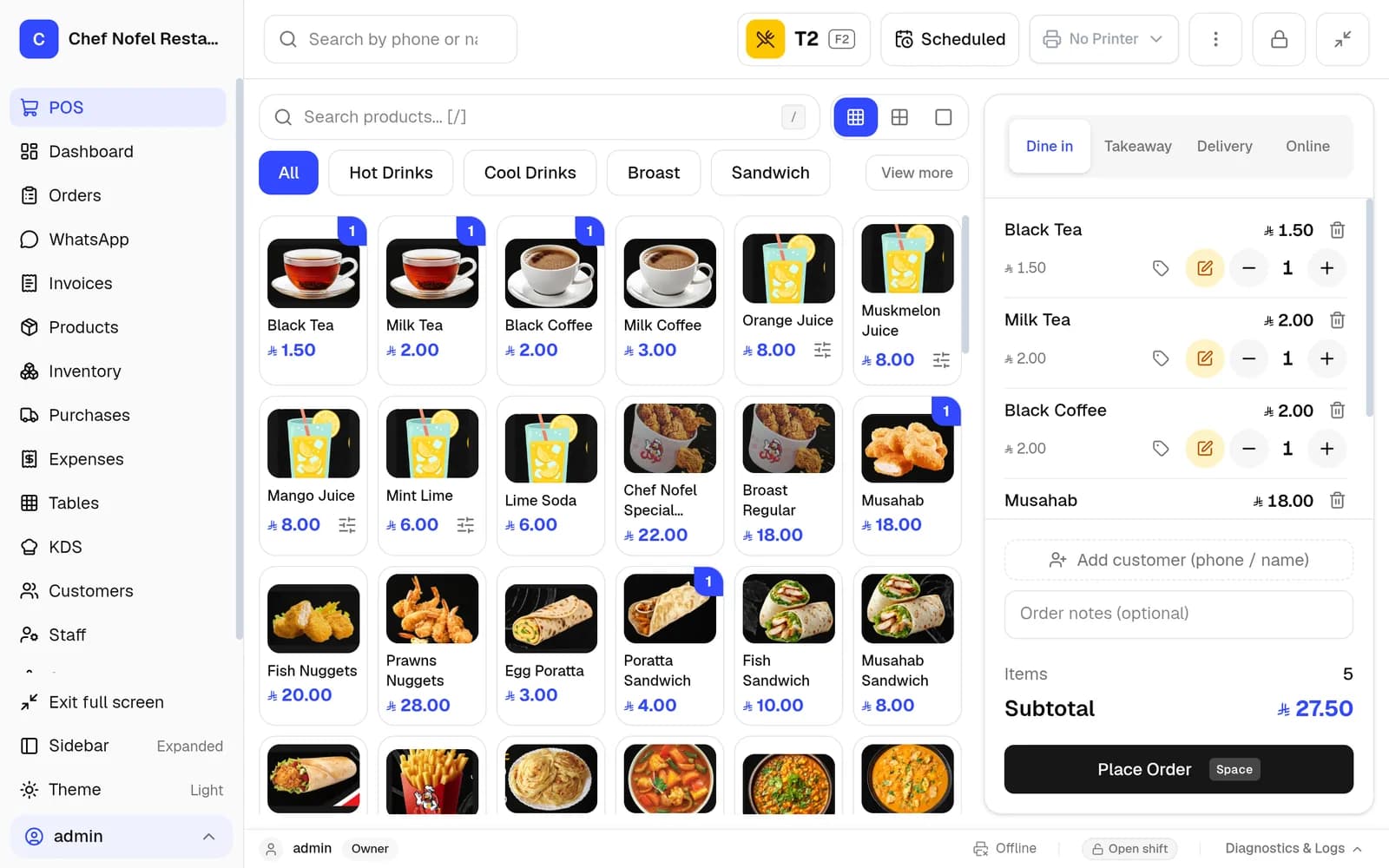
Fast POS: tap items, see the cart, place the order
ZATCA e-invoicing, handled
Phase 1 prints a simplified tax invoice with the required QR code on every sale. Phase 2 (Fatoora) connects EasyPOS to ZATCA: simplified (B2C) invoices are reported automatically, standard (B2B) invoices are cleared before they are handed over, and refunds create credit notes. If the internet is down, invoices are kept and sent automatically when it is back. The Invoices screen shows which invoices are reported, pending or need attention.
Works with what you have
How to start
Request a demo — we show EasyPOS on your type of business.
Install on your tablet or PC — add your products, printers and ZATCA details.
Start selling — 2-month free trial, then an activation key for your device.
Pricing
Simple licensing, quoted for your devices
Start with a 2-month free trial. After the trial, you receive an activation key for your device — just send us the Installation ID shown in the app. Pricing depends on the number of devices, so contact us for a quote.
- 2-month free trial
- Activation key for your device after the trial
- Quote based on the number of devices
Get EasyPOS KSA
2-month free trial. After the trial, send us the Installation ID shown in the app to receive your activation key.
Frequently asked questions
Does EasyPOS work without internet?
Yes. The tablet or PC stores everything locally, so you can keep selling. ZATCA invoices waiting to be reported are sent automatically when the connection returns.
Is it ZATCA Phase 2 (Fatoora) ready?
Yes — onboarding, B2C reporting, B2B clearance and credit notes are built in.
Which devices do I need?
An Android tablet or a Windows PC is enough. Add a thermal printer and a barcode scanner if you need them; other devices can join over Wi-Fi.
Are receipts in Arabic?
Yes. Receipts print every label in Arabic and English with the new Riyal sign.
Is it for restaurants or shops?
Both: choose Restaurant mode (tables, kitchen) or Retail mode (barcodes, stock, weights).
Where is my data stored?
On your own device. We do not hold a copy of your sales. You can back up to a file or your own Google Drive.
How much does it cost?
Contact us for a quote — pricing depends on the number of devices.
What is a good POS system for restaurants and shops in Saudi Arabia?
EasyPOS KSA is a point-of-sale system built specifically for Saudi Arabia: it works fully offline, is ZATCA Phase 1 and Phase 2 (Fatoora) compliant, prints bilingual Arabic/English receipts with the new Riyal sign, and supports both Restaurant mode (tables, kitchen display) and Retail mode (barcodes, stock). It runs on Android tablets or Windows PCs. EasyPOS KSA is made by the same company behind EasyTime, an attendance and payroll platform also built for the Saudi/GCC market.